Capture feedback, rank it by revenue, and close the loop.
Free for 30 days · No credit card · 2-minute setup
- Slack
- Jira
- Linear
- GitHub
- Webhook
- ClickUp
- Monday.com
- Asana
- Trello
- TestRail
- GitLab
- Azure DevOps
- Zapier
FeedbackGraph by the numbers — and the starting price
- Widget weight
- <40KB
- Report → enriched
- Seconds
- Duplicates merged
- 3,000→1
from $4.99/mo
Starting price · free for 30 days
Everything it takes to turn feedback into fixes
Capture in two clicks
A featherweight widget that loads in a blink. Anyone can grab a screenshot or screen recording, point at what broke, and send it — no account, no friction.
AI that shows its work
Every report arrives with a plain-English title, summary, type and severity — sitting right next to the console errors, failed requests and on-screen text it read. You see the reasoning, never a black box.
No more duplicate pile-ups
FeedbackGraph spots near-identical reports and folds them into one, counting every occurrence. Your inbox stays the size of your real problem list — then filter, search and drag across a Kanban board.
Routes to where your team works
One click sends an issue to Jira, Linear, GitHub or Slack. Close it there and the status flows back automatically — and the person who reported it hears the moment it’s fixed.
Your data, walled off
Every team’s data is sealed away from every other team’s, enforced deep in the database on every request (Postgres row-level security). Six built-in roles decide exactly who can see and do what.
Simple, honest billing
Pick a plan, pay monthly or yearly, and FeedbackGraph keeps you inside your limits automatically. Upgrade, downgrade or cancel anytime — no sales call required.
How does FeedbackGraph work?
Drop in one snippet
Paste a single line of code on your site. Your capture widget is live in minutes — no SDK wrangling, no deploy gymnastics.
Let the report explain itself
Someone hits “report”. FeedbackGraph redacts anything private, then writes the title, severity and summary with the raw evidence attached.
Route it and close the loop
The issue lands in your tracker, the right people get pinged, and the reporter is told the moment it ships.
What does FeedbackGraph look like in action?
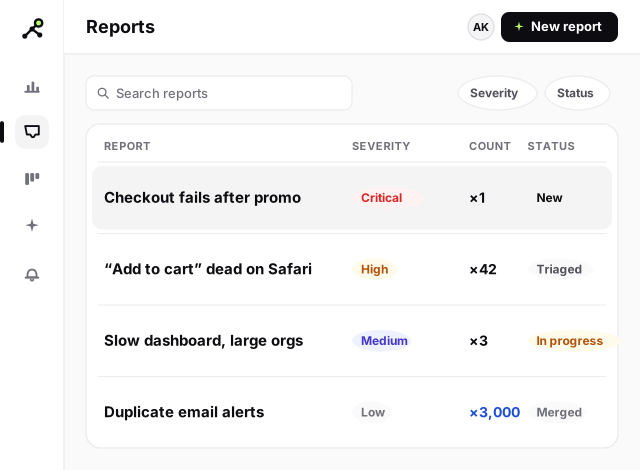
An inbox that triages itself
Reports show up already sorted by type and severity, with duplicates merged and the evidence one click away. No more spreadsheets, no more guesswork.
- Evidence beside every AI verdict
- Duplicates merged automatically
- Public feedback form for guests
- Live public status page
- Daily digest so nothing slips
- GDPR export & delete built in
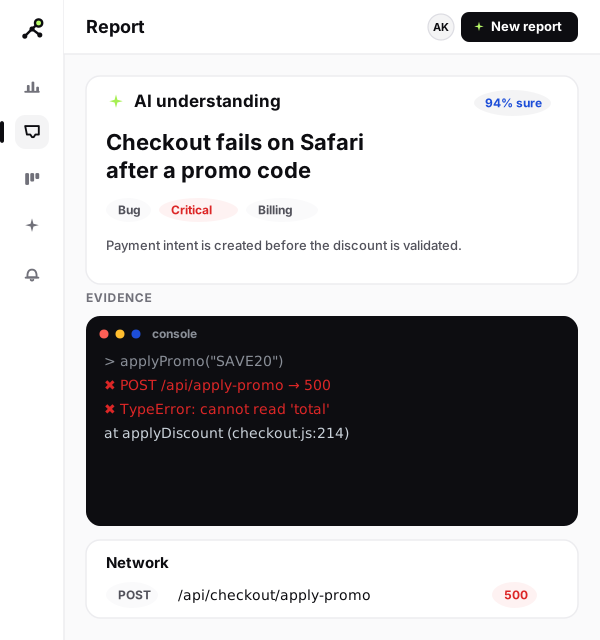
AI that shows its work
Every verdict — title, summary, type and severity — sits beside the console errors, failed requests and JavaScript exceptions it came from. Your engineers trust it because they can check it.
- Console, network and error logs attached
- Plain-English title, type and severity
- Check the reasoning behind every verdict
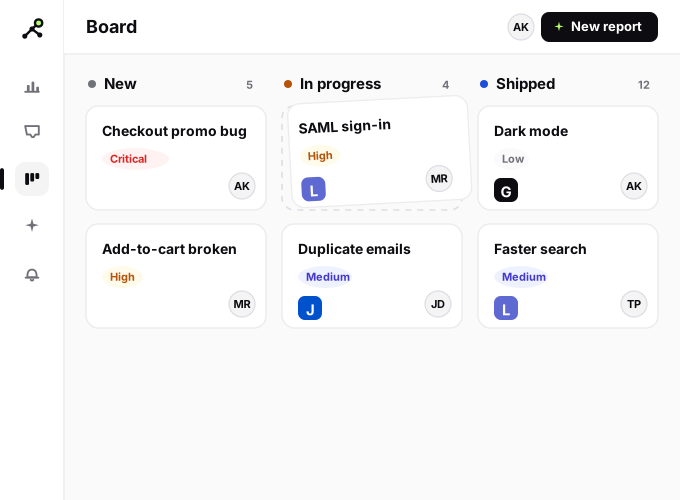
A board the whole team can run
Drag issues from new to shipped, assign owners, and watch statuses sync to Jira, Linear or GitHub — and back to the people who reported them.
- Drag issues from new to shipped
- Assign owners and due dates
- Two-way sync with Jira, Linear and GitHub
More revenue, fewer bugs, faster QA and UAT
FeedbackGraph turns every bug report and feature request into an outcome your whole team can measure.
Grow revenue
Rank every request by the accounts and ARR behind it, so you ship what customers actually pay for — and expand revenue instead of guessing.
Ship a stable product
Catch regressions and user-reported bugs — with full console, network and error evidence — before they reach more customers. Fewer escapes, more stable releases.
Find bugs faster
Two-click capture attaches the technical context automatically, so engineers reproduce and fix in minutes — not email threads.
Make QA & UAT easy
Testers file repeatable, evidence-rich bug reports, triage on a shared board, and sign off UAT faster — no spreadsheets, no lost repros.
Why choose FeedbackGraph?
Capture, AI triage with the evidence attached, automatic dedupe, routing, and closed-loop updates — in a single tool your team and your customers both feel. No black boxes, no busywork.
We’re building toward every feedback source in one place
See exactly what’s shipped, what’s in progress and what’s next — out in the open, with nothing oversold.
View the public roadmapHow much does FeedbackGraph cost?
Start free for 30 days. Pick a plan when you’re ready — pay monthly or save with annual.
Starter
For small teams getting feedback into one place.
Growth
Most popularThe full AI + integration suite for growing products.
Pro
For busy teams handling feedback at serious volume.
Loved by teams that ship
“Our triage time dropped to almost nothing. The evidence panel is why our engineers actually trust the AI.”
“Two clicks for a video bug report with the console logs attached — our QA team finally enjoys filing bugs.”
“Dedupe alone saved our inbox. Thousands of duplicate reports collapsed into one during launch week.”
Can I use FeedbackGraph inside my AI agent?
Pull a report with full evidence — or the top revenue-backed opportunities — straight into Claude Code, Cursor or a Slack agent. Read-first, tenant-isolated, PII-redacted.
Explore the MCP serverFrequently asked questions
What do I get on the free trial?+
A full 30 days with every feature unlocked and a generous signal allowance — no credit card to start.
Can I cancel anytime?+
Yes. Manage, upgrade or cancel yourself through the Polar customer portal, with proration handled for you.
Is my data safe?+
Private details are redacted before any AI sees them, each team’s data is isolated at the database level, media links expire, and you can export or delete everything on request.
Will it work on every device?+
The capture widget and the dashboard are fully responsive — the dashboard feels like a native app on your phone.
How does FeedbackGraph increase revenue?+
Every request is ranked by the accounts and ARR behind it, so you build and fix what paying customers actually want. Acting on the bugs and features tied to real revenue protects renewals and unlocks expansion — instead of guessing from a raw backlog.
How does FeedbackGraph help QA and UAT teams?+
Testers file repeatable, two-click bug reports with the environment, console, network and error context captured automatically. Teams triage on a shared board, assign owners, and sign off UAT faster — no spreadsheets and no lost reproduction steps.
How do I catch bugs before customers do?+
Capture bugs during QA, UAT and internal dogfooding with full technical evidence, let AI flag the severity, and route regressions to your tracker in one click — so you ship a more stable product and fewer issues escape to production.
Start fixing bugs faster today
Paste one snippet and your first AI-enriched report lands seconds later. Free for 30 days.