Everything you need to capture, understand and route feedback
Two-click capture, AI that explains itself, automatic duplicate-merging, and routing that closes the loop — all in plain language.
Two-click capture
A small, fast widget. Snap a screenshot, mark up the problem, blur anything private, or record your screen — and it grabs the console errors and network details engineers need. Reports even wait offline until you’re back online.
AI that explains itself
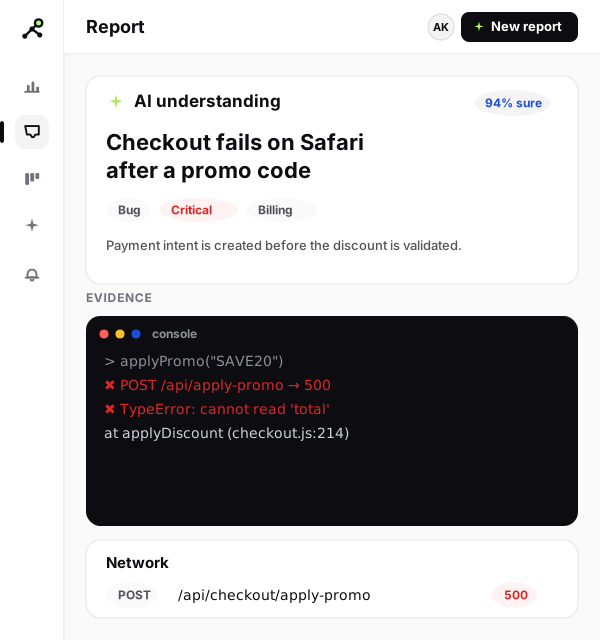
Every report comes back with a clear title, summary, type and severity — shown next to the raw evidence it read. Cheaper checks run first; the full AI steps in only when it’s unsure.
Inbox, board and auto-merge
A tidy inbox with filters and search, a drag-and-drop board, and automatic grouping of near-identical reports — so duplicates never bury the work that matters.
Routing with status sync
Send any issue to Slack, Jira, Linear or GitHub in one click, set rules to auto-route the rest, and let statuses flow both ways — so the reporter always knows where their fix stands.
Roles & team isolation
Each team’s data is sealed off from every other team’s and enforced on every request (Postgres row-level security). Six ready-made roles — Owner, Admin, Triager, Developer, Viewer and Billing — keep access tidy.
Billing & limits
Self-serve Polar checkout and customer portal, monthly or yearly plans, and limits on seats, projects, reports and AI usage that are enforced for you — no surprises.
How does FeedbackGraph work?
Drop in one snippet
Paste a single line of code on your site — or share a hosted feedback URL with no code at all.
Let the report explain itself
FeedbackGraph hides anything private, then writes the title, severity and summary with the evidence attached.
Route it and close the loop
The issue lands in your tracker, the right people are notified, and the reporter hears the moment it ships.
How does FeedbackGraph’s AI show its evidence?
Every verdict sits right next to what it’s based on: the console errors, the failed requests, the JavaScript exceptions and the text read straight off the screenshot. You never have to take the AI’s word for it.
- Private details removed before any AI sees them
- Free, consistent duplicate-matching — no AI guesswork
- Full AI only called in when it’s genuinely unsure
How does FeedbackGraph keep my data private?
Security comes built in. Sensitive data is handled carefully at every step, and you stay in control of what’s kept and for how long.
- Your data is walled off from every other team’s
- Integration keys stored encrypted
- Screenshots upload straight to secure storage, never through your servers
- Shared media links expire on their own
- Only your approved sites can send reports
- A clear history of who did what on every report
- Keep data exactly as long as you need
- GDPR export & delete on request
Feature FAQ
Does the AI explain its decisions?+
Yes. Every AI verdict — title, summary, type and severity — is shown right next to the console errors, network requests, JavaScript exceptions and on-screen text it was based on. You can always check its work.
What gets captured with each report?+
The screenshot or screen recording the reporter creates, plus console logs, network requests, JavaScript errors, the page URL and browser context — captured automatically so engineers have what they need to reproduce the issue.
Where can reports be routed?+
To Jira, Linear, GitHub and Slack in one click, with two-way status sync. Seven more providers, Zapier for no-code automation, and a signed generic webhook are available, plus rules to auto-route by type, severity or project.
How hard is it to install?+
Add one JavaScript snippet to your site and the widget is live in minutes. Prefer no code? Share a hosted feedback URL instead.
How is sensitive data handled?+
Descriptions, OCR text and transcripts are run through PII redaction before any AI sees them. Integration credentials are encrypted at rest, media is served via short-lived signed URLs, and each team’s data is isolated at the database level.
How does FeedbackGraph compare to Jam.dev, Canny and Enterpret?
FeedbackGraph unifies developer bug capture, a feedback board and voice-of-customer analytics into one loop — with a revenue-backed Evidence Graph and an MCP server.